
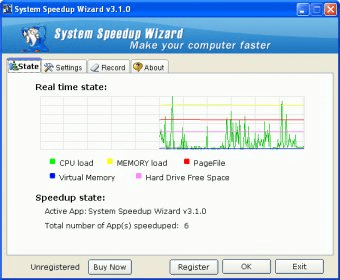
System Speedup Wizard is a program that increases computer performance reallocating CPU power. The "State" tab will show you the real time state of your system while the program is being run. This will include the CPU load, the memory load, page file, virtual memory and hard drive free space. This information will be displayed through a graph, with different colors for each value. The program will also show you how many applications are running faster thanks to the use of it.
The "Settings" tab will allow you to configure the optimization method and options. You will be able to set the program to start at Windows Startup, run minimized, enable the program or set it to be always on top. You can also select the optimization method (high or real time), and the record settings. The "Record" tab shows the registry of optimized applications, and the method applied. You can clean the record or save it to disk for future reference. At the bottom of the interface you will see buttons to buy, register or leave the program.





Comments